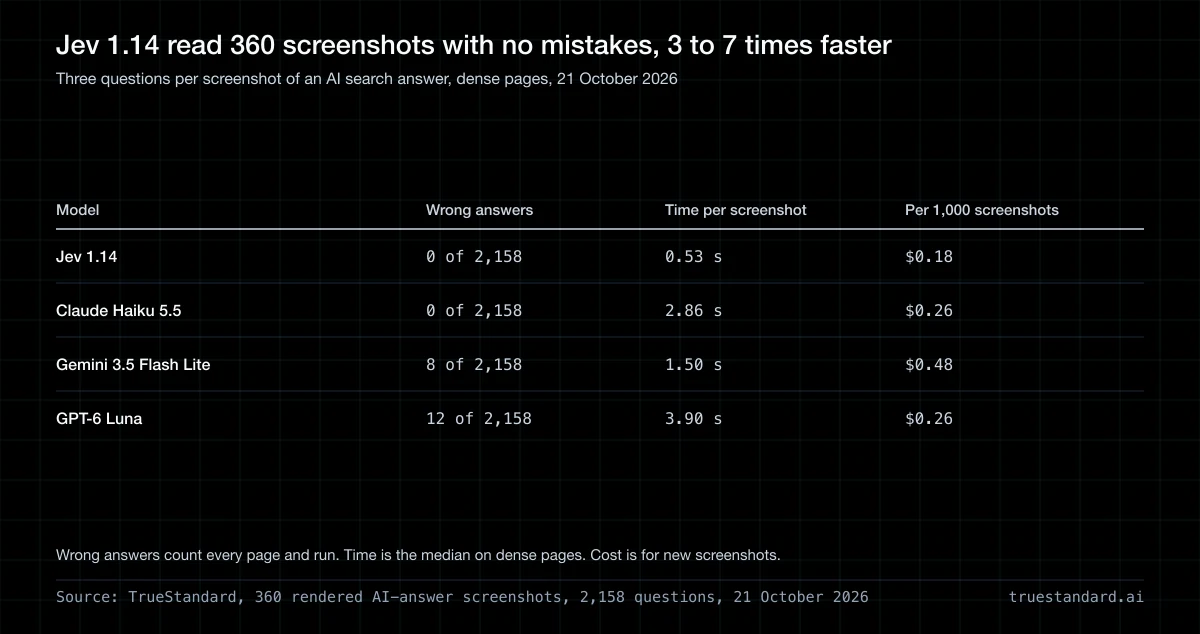
On 21 October 2026 we gave Jev 1.14 and three cheap vision models 360 screenshots of AI search answers. Jev answered all 2,158 questions right, in about half a second each, for 18 cents per 1,000 screenshots. Claude Haiku 5.5 matched it on accuracy and took five times as long.
Jev images arrived with Jev 1.14 on 14 October 2026. TypeSafe's decision model can now read a PNG or JPEG and answer closed questions about it. The first use we saw pitched was an AI search tracker: screenshot what ChatGPT or Google says about your category, then ask if your brand is in the answer. That is the job we tested.
The short answer
Jev 1.14 answered 2,158 questions about the screenshots and got none wrong. Claude Haiku 5.5 also got none wrong. Gemini 3.5 Flash Lite missed 8 and GPT-6 Luna missed 12. When the two of them were wrong, they were sure of it.
Jev took about half a second per screenshot, against 1.4 to 3.9 seconds for the chat models. It also cost the least: 18 cents per 1,000 screenshots, against 26 cents for Haiku and Luna and 48 for Flash Lite.
Three questions per screenshot, dense pages, 21 October 2026
| Model | Wrong answers, all pages | Time per screenshot | Per 1,000 screenshots |
|---|---|---|---|
| Jev 1.14 | 0 of 2,158 | 0.53 s | $0.18 |
| Claude Haiku 5.5 | 0 of 2,158 | 2.86 s | $0.26 |
| Gemini 3.5 Flash Lite | 8 of 2,158 | 1.50 s | $0.48 |
| GPT-6 Luna | 12 of 2,158 | 3.90 s | $0.26 |
Wrong answers count every page and every run. Time is the median on the dense pages. Cost is for new screenshots, without the discount one provider gave on repeat images.
On this job, reading text in a screenshot, Jev is as accurate as the best cheap vision model we tried. It is faster and costs less. The money is small for every model, though. Reading 10,000 screenshots costs $1.81 on Jev and $4.81 on the dearest model here.
Every earlier Jev test was on text
An AI search tracker asks the same few questions of every screenshot. Is my brand in the answer? Who is listed first? Is something covering the page? Each answer is closed: yes or no, or one of a short list. Jev was built for questions like these.
We already knew how Jev does on text. It held up on 108 claims checked against their sources, and it is 1.7 times faster than a cheap chat model on one decision. Images are new, and TypeSafe's own documentation says they are not yet up to its standards to call ready for production.
The one public test we found ran 30 photos through Jev 1.14 and 1.13. It compared the two versions with each other and with no other model. Its author found 1.14 matched fewer photos to their own headlines than 1.13 did (15 of 30 against 23). Nobody had put Jev beside a vision LLM on the same images.
How we built the test
We wrote 60 buyer questions in 12 categories, such as "best running shoes for beginners" and "best CRM for small business". A separate model, Gemini 2.5 Flash Lite, wrote an answer to each in the shape AI search uses. Each answer has a one-line intro, five to seven picks with a short reason, and a closing line. That model took no part in the test.
We built each answer into a search results page in Chrome and took a screenshot. Because we wrote the page, we know which brands are in the answer, which comes first and whether a pop-up is open. The answer key came from the page text. No person or model read the picture to make it.
Every screenshot got the same three questions, worded the same way for every model:
- Does the AI answer name this brand? Count only the panel labelled AI answer, not ads, sponsored cards, sidebars or pop-ups.
- Which brand does the AI answer list first? Pick one of four. One of the four is a brand from an ad.
- Is a pop-up covering part of the page?
All three questions went in one call per screenshot. Each model answered with a probability. Jev returns one by design, and we asked the chat models for one. We counted an answer as right when it landed on the correct side of 50 percent.
Our own answer key was wrong once. On the first pass all five models said Proton VPN was in one answer. They were right. The answer wrote "ProtonVPN" and our checker searched for "Proton VPN". We fixed the label before any other run. We also dropped two questions about the email tool Kit, because the answer named ConvertKit, Kit's old name.
Three kinds of page
Clean pages alone would not tell the models apart, so we made the pages harder in two steps.
| Page | Screenshots | What is on it |
|---|---|---|
| Clean | 180, one run | The answer as a bold numbered list, with related searches, one sponsored card or a sign-up pop-up beside it. |
| Dense | 120, three runs | Two sponsored product cards above the answer, a sponsored sidebar card, a People also ask box and smaller text. One extra brand appears only inside another pick's reason. Half the pages have a pop-up. |
| Small print | 60, three runs | A dense page with the answer as grey 12-pixel prose, no bold brand names, saved as a low-quality JPEG. |
On the dense and small-print pages, the brand we asked about sat in one of four places, split evenly. It was in the list of picks, inside another pick's reason, only in an ad, or nowhere on the page. We left Jev 1.13 off the small-print pages, because it had matched 1.14 on every answer up to then.
Where the models went wrong
Jev 1.14, Jev 1.13 and Claude Haiku 5.5 answered every question right on all three page types. Gemini 3.5 Flash Lite and GPT-6 Luna slipped on the dense pages, and Luna slipped more on the small print.
Screenshots with all three answers right
| Model | Clean | Dense | Small print |
|---|---|---|---|
| Jev 1.14 | 100% | 100% | 100% |
| Jev 1.13 | 100% | 100% | not run |
| Claude Haiku 5.5 | 100% | 100% | 100% |
| Gemini 3.5 Flash Lite | 100% | 98.6% | 98.3% |
| GPT-6 Luna | 99.4% | 98.6% | 96.7% |
Clean pages ran once; dense and small-print pages ran three times each.
The 20 mistakes
- A brand named only inside another pick's reason, read as not named: Flash Lite 7 times, Luna 4 times.
- A sponsored card with a Shop now button, read as a pop-up: Luna 7 times.
- A brand that appeared only in an ad, read as named: Flash Lite once.
- A brand that was nowhere on the page, read as named: Luna once.
Every one of those 20 answers was confident. Each sat at 0, 0.99 or 1.0 on the wrong side. A threshold would not have caught them. Jev never had a wrong answer to be sure of. Nineteen in twenty of its answers sat at 0.98 or higher, and its least sure answer, at 0.84, was still right.
The gaps are small: 8 and 12 mistakes in 2,158 answers. On the dense pages the difference between Jev and Flash Lite held up when we resampled the screenshots. So did the gap to Luna on the small print. The other gaps could be chance.
A brand named in passing is still named
Most of the chat models' misses came from one sentence pattern. A pick's reason ended with "Often compared with Altra." Asked whether the answer named Altra, Flash Lite said no. Altra is not a pick, but the answer names it.
A tracker should count that mention. Being named beside a rival is a real presence in the answer, and a count that drops it under-reports you. It also shows that the wording of your question decides your number. Ask whether the answer names your brand, or whether it recommends it, and decide which you want before you start counting.
Speed per screenshot
Jev answered in about half a second on all three page types. The chat models took three to seven times as long.
Median time per screenshot, three questions in one call
| Model | Clean | Dense | Small print |
|---|---|---|---|
| Jev 1.14 | 0.49 s | 0.53 s | 0.45 s |
| Gemini 3.5 Flash Lite | 1.80 s | 1.50 s | 1.42 s |
| Claude Haiku 5.5 | 2.79 s | 2.86 s | 2.69 s |
| GPT-6 Luna | 3.75 s | 3.90 s | 3.60 s |
Wall-clock time, including the network. Jev was called on TypeSafe's own endpoint. The chat models went through a third-party router, which adds to their times.
On the dense pages Jev was 2.8 times faster than Flash Lite, 5.4 times faster than Haiku and 7.4 times faster than Luna. For a tracker that runs overnight, none of these times matter much. A check that runs while someone waits will feel the gap between half a second and three.
Cost per screenshot
Models bill by the token, a small chunk of text or image. Jev counts more tokens per image than the chat models do, and still costs the least. It counted about 4,300 input tokens for a dense screenshot with three questions. The chat models counted 1,260 to 2,190 for the same image. Jev's price is $0.042 per million input tokens, and it does not charge for output.
Cost per 1,000 new screenshots, three questions each
| Model | Input tokens per screenshot | Clean | Dense |
|---|---|---|---|
| Jev 1.14 | 3,888 to 4,305 | $0.16 | $0.18 |
| Claude Haiku 5.5 | 1,978 to 2,186 | $0.22 | $0.26 |
| GPT-6 Luna | 1,733 to 1,895 | $0.24 | $0.26 |
| Gemini 3.5 Flash Lite | 1,257 to 1,258 | $0.48 | $0.48 |
First-pass prices. On our second and third runs, GPT-6 Luna's price fell to a fifth because the provider discounted the repeated image prompt. A tracker sends each screenshot once, so we priced every model on new images.
Jev is 1.4 times cheaper than Haiku and Luna and 2.7 times cheaper than Flash Lite. At any of these prices, the model is not where a tracker spends its money. Capturing the pages, storing them and running the browser cost far more than the 18 to 48 cents per 1,000 reads.
Is Jev 1.14 better at images than 1.13?
Not on our pages. We ran both versions on the clean and dense screenshots, 1,618 questions each. They gave the same answers and counted the same tokens for every image, so they cost the same. Jev 1.14 was 43 milliseconds faster at the median on clean pages and 20 on dense ones.
Box questions do need 1.14. A Box question asks where something is and returns its edges as fractions of the image. We tried one: we asked for the AI answer panel on a dense page. Each edge of the box came back within 1.2 percent of the panel's real edge, at a confidence of 0.77. One try is not a test, so we report it and nothing more.
A router can drop the image without an error
Our first image call went through a third-party model router. The router accepted the request, returned success and billed 295 input tokens, the size of a text-only call. Jev answered 0.47, which is a coin flip. The image never reached the model, and nothing said so.
Send image calls to TypeSafe's own endpoint, with the header TypeSafe-Danger-Zone-Images set to true. Then check the token count on the first call. A screenshot should add thousands of input tokens. If it adds none, the model is answering blind.
What this test does not cover
Pages we rendered ourselves
We built the pages ourselves so the answer key would be exact. Live ChatGPT and Google answers carry carousels, citations, cookie banners and fonts that ours do not.
One page design
All 360 screenshots share one layout family. A model that reads ours well may still stumble on a layout it has not seen.
Reading text only
Every question had its answer written in the pixels as text. We did not test design judgment, photos, charts or faces, and TypeSafe's own warning is about images in general.
Default settings
The chat models ran at their default settings with a request for JSON. Luna spent a few reasoning tokens on every call and Haiku on about four calls in ten. A different prompt or setting could move their numbers.
Which one to use
If you are reading text in screenshots at volume, Jev 1.14 is the fastest and cheapest of the four, with no loss in accuracy on our pages. Claude Haiku 5.5 matched it on accuracy and is the one to fall back to when Jev is down. Gemini 3.5 Flash Lite and GPT-6 Luna were right more than 99 percent of the time, but their few misses came with full confidence.
| If you need | Use |
|---|---|
| Thousands of screenshots a day, closed questions | Jev 1.14, with Haiku 5.5 as the fallback |
| An answer while someone waits | Jev 1.14, at about half a second |
| A judgment about design, photos or charts | A vision LLM, measured on your own images first |
| A check on text you already have | The text itself |
One caution carries over from our text tests: a perfect score on one set of pages is a measurement of those pages. Before you gate anything on Jev, label 50 to 100 of your own screenshots by hand and count how often it agrees. When your labels and the model disagree, check the labels first. Ours were wrong once in this study.
Frequently Asked Questions
Can Jev read images?
Yes, since Jev 1.14 on 14 October 2026, and Jev 1.13 accepts them too. It takes PNG and JPEG files between 256 and 1,568 pixels on each side, behind the header TypeSafe-Danger-Zone-Images. It answers the same closed questions it answers about text: yes or no, one of a list, or a score. It does not describe an image in words.
How accurate is Jev at reading images?
On our 360 screenshots of AI search answers, Jev 1.14 answered 2,158 questions with no mistakes, tested on 21 October 2026. Claude Haiku 5.5 also made none, Gemini 3.5 Flash Lite made 8 and GPT-6 Luna made 12. Every question had its answer written as text in the screenshot. We did not test photos, charts or design.
How much does Jev cost per image?
About $0.00016 to $0.00018 per screenshot in our test, with three questions asked at once. A 1440 by 1024 screenshot counted about 4,300 input tokens at $0.042 per million, and output is free. That is $0.18 per 1,000 screenshots, against $0.26 for Claude Haiku 5.5 and GPT-6 Luna and $0.48 for Gemini 3.5 Flash Lite.
Is Jev faster than GPT or Claude at reading screenshots?
Yes, on our test. Jev 1.14 took 0.45 to 0.53 seconds per screenshot at the median. Gemini 3.5 Flash Lite took 1.4 to 1.8 seconds, Claude Haiku 5.5 2.7 to 2.9 and GPT-6 Luna 3.6 to 3.9. That makes Jev about 3 to 7 times faster, with three questions asked in one call.
Can I use Jev images to track AI search visibility?
For reading a screenshot you already have, yes: it found brands in the answer panel and ignored ads on our test pages. Decide first whether you are counting mentions or recommendations, because the wording changes the count. Then test it on your own captures, because live pages are messier than ours.
Why does Jev answer as if it cannot see my image?
Check where the call went. When we sent an image through a third-party model router, the request succeeded but the image was dropped, and Jev answered 0.47. Send image calls to TypeSafe's own endpoint with the TypeSafe-Danger-Zone-Images header set to true. A screenshot should add thousands of input tokens to the bill.
Is Jev 1.14 better than 1.13 at images?
Not on our test. On 1,618 questions each, the two versions gave the same answers and counted the same tokens. Jev 1.14 was 20 to 43 milliseconds faster at the median. You need 1.14 for Box questions, which return where something sits in the image.
Is Jev's image input ready for production?
TypeSafe says not yet. Its documentation calls images and Box questions not up to its standards for production, and says the request format may change between releases. Our results are good for one narrow job, reading text in screenshots. Pin the version, keep a fallback model and measure it on your own images before you rely on it.
Keep reading
Is There a Most Accurate AI Model?
The honest answer is no. The ranking changes with the task, the benchmark, and the month, and even the leader still hallucinates.
Why AI Is Confidently Wrong
AI is confidently wrong because a model has no internal sense of when it is wrong. In one Carnegie Mellon task, chatbots showed about 90 percent confidence at about 65 percent accuracy.
Should You Stop Using ChatGPT?
No. Keep using ChatGPT to draft, and stop trusting it unchecked. Researchers found AI made experts measurably worse on hard tasks, and it tends to agree with you when it should push back.
AI Hallucination Rates in 2026, by Model
On hard factual questions, AI hallucination rates across 26 top models run from 22 to 94 percent, per the Stanford AI Index 2026. Each number here names the benchmark it came from and what that benchmark measured.
An Originality.AI Alternative
If the job is checking claims before you publish, TrueStandard is an Originality.AI alternative built only for that. It runs each claim past four models from different labs. Originality.AI's fact check is one of five bundled checks, on one model.
One model's answer is one draw
Two cheap models here gave wrong answers at full confidence, and a second model is how you catch that. TrueStandard checks your draft against several models at once and shows you every claim they disagree on.
TrueStandard is for writers who publish AI-assisted drafts. Paid plans check every claim and citation across four AI models before you hit publish.
Free: one check a day, no signup. Pro is $20 a month for 250 drafts.
Start Verifying →